PlayNest: MP3 Music
- 5.0
- Rating
- 10.00K
- Installs
- Free
- Price

 Analysis by App-foxy
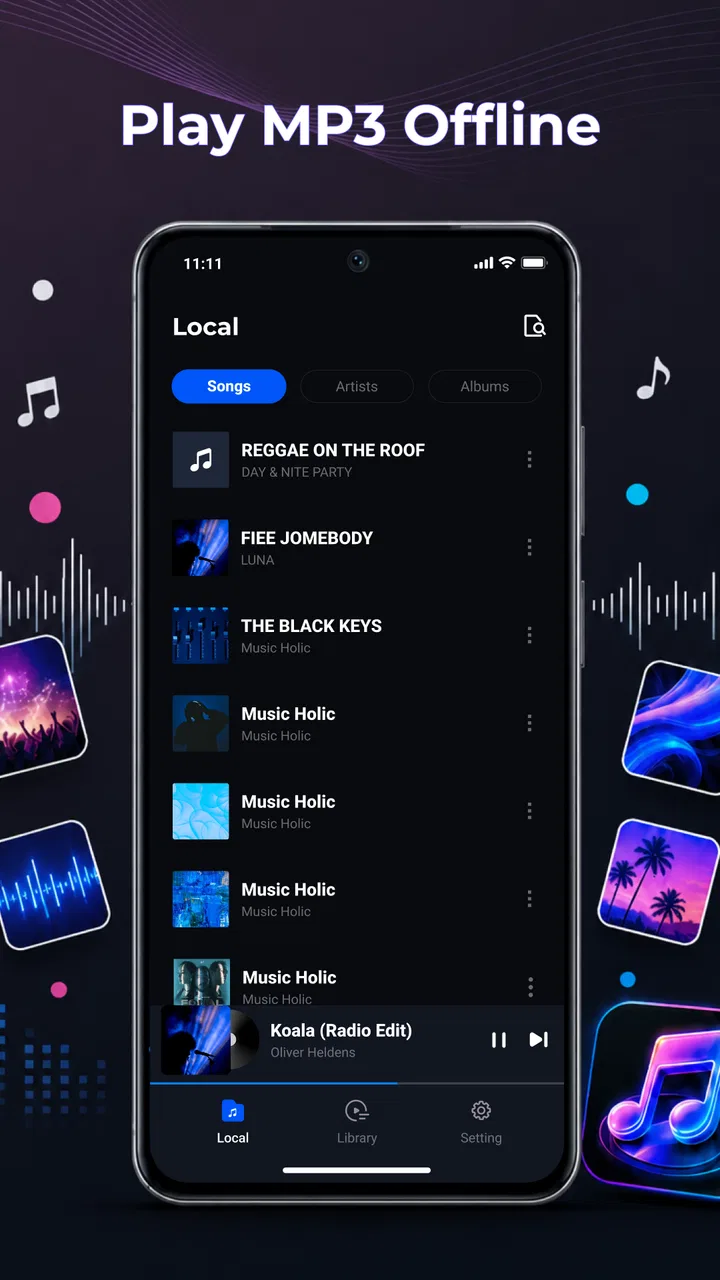
When I review a music player, I try not to judge it by a long feature list. I want to know whether it makes the simple act of listening easier, especially when I already own the audio files and do not want another subscription, account, or internet connection in the middle of my routine. PlayNest: MP3 Music takes that straightforward route. It is a free Music & Audio app from SmarTtDev built around offline MP3 playback, folders, playlists, and controls that remain useful while the app is running in the background.
That focus makes it interesting for a particular kind of listener: someone who keeps music locally on an Android phone and wants a practical way to organize it. I tested it with the mindset of a person preparing a small personal library rather than browsing a streaming catalog. The result is a clean, focused tool with a sensible everyday purpose, although its narrow scope also means it will not replace a streaming service or a full desktop music-management program.
Starting with a personal music library
The first thing to understand is what PlayNest is—and what it is not. It is not a service for discovering new releases, following artists, or downloading a ready-made catalog. Its value begins when MP3 files are already stored on the device. From there, the app gives those files a more usable listening environment than opening them one at a time through a general file manager.
You May Also Like

 AccuWeather: Weather Radar
AccuWeather Review: A Quick, Clear Forecast for Everyday Decisions
For everyday plans, the best forecast is the one you can understand quickly. AccuWeather makes rain timing, radar, and local conditions easy to act on, with a few trade-offs.

 Hill Climb Racing
Why Hill Climb Racing Still Turns Crashes Into One More Run
A tiny car, a bumpy hill and one more upgrade: Hill Climb Racing keeps resurfacing because its simple chaos makes every near-miss feel personal.

 AliExpress - Shopping App
AliExpress Makes Global Shopping Feel Personal, but Shoppers Bear the Risk
AliExpress turns a global marketplace into a pocket-sized discovery engine. Its reach is useful, its shopping loop compelling, and its trade-offs easy to miss.

 Lords Mobile: Kingdom Wars
Lords Mobile Is a Kingdom-Building Routine, Not a Quick Match
A case-by-case verdict on the building, battles, device demands, and social commitments that make Lords Mobile rewarding for some players and exhausting for others.

 PDF Scanner app - TapScanner
TapScanner Makes Paperwork Easier to Capture, Check, and Share
TapScanner makes scanning with a phone feel less like a rescue operation and more like a dependable step in getting work done. Its capture tools are useful, though not flawless.

 Block Blast!
 Shows How Much a Puzzle Game Can Leave Out
A quiet grid game shows why puzzle players increasingly value instant clarity, repeatable skill and low-pressure play—and where the genre still needs to catch up.
More From Our News Desk
View All News


I like this starting point because it keeps the creative decision in the listener’s hands. If you have recordings, purchased tracks, rehearsal mixes, podcasts saved as MP3 files, or a carefully assembled collection, you can treat those files as your own source material. The app’s folder support is especially relevant here. A library can be arranged around albums, moods, projects, trips, or personal archives instead of being forced into the structure chosen by a streaming platform.
That folder-based approach is also useful for people who make audio rather than merely consume it. A musician might keep rough demos separate from finished mixes. A video creator could store temporary music beds in one place and reference tracks in another. Someone preparing a presentation or a small event could create a listening folder for the material they need to check. PlayNest does not become an editing studio in these situations, but it can serve as a convenient review station for local audio.
The app is rated for Everyone, which suits its uncomplicated purpose. It is also free, so trying it does not require a financial commitment. Its current version is 1.0.2, and the project comes from SmarTtDev. The app has reached over ten thousand installs and holds a 5.0 average from twenty-three ratings, with one written review. I treat those figures as encouraging but still limited: they suggest early user satisfaction, not the same level of long-term evidence available for a mature, widely tested player.
Before relying on any offline player, I would make one practical check: confirm that the files are actually stored on the phone and are in a format the app can read. PlayNest is designed around MP3 playback, so it is a better match for a conventional MP3 collection than for someone whose library is spread across unusual formats or cloud-only storage. That distinction matters more than the attractive simplicity of the interface.
Who gets the most from the offline approach
I would recommend it first to listeners who want control over their own files. It makes sense for a commute through areas with unreliable reception, travel where mobile data is expensive, or a workspace where streaming is inconvenient. It is also a good fit for people who dislike algorithmic recommendations and simply want to press play on music they have already chosen.
There is a quieter benefit for creators and hobbyists. Streaming apps are excellent for public catalogs, but they are often awkward when the audio is personal, unfinished, private, or not available online. A local player lets you listen to those files without uploading them to a service or mixing them into a public account. For reviewing a collection of self-made tracks, that privacy and independence can be more important than social features.
On the other hand, I would skip PlayNest if your main goal is finding music rather than managing music you already have. If you expect synchronized libraries across several devices, editorial playlists, lyrics, artist radio, or an online backup, the usual streaming alternatives are better equipped. The app’s strength is not breadth; it is the direct path from local file to personal listening queue.
Building a usable listening workflow
Once the files are in place, the combination of folders and playlists gives the app two different organizational levels. Folders are useful for the physical or logical structure of the library, while playlists are better for temporary listening decisions. I would use folders to preserve the collection and playlists to shape a session. That separation prevents a short-term queue from forcing you to reorganize the underlying files.
For example, imagine I am preparing audio for a long train journey. I could leave my album folders untouched, then make a travel playlist containing a mixture of familiar albums and individual tracks. After the trip, the playlist can be changed without disturbing the original organization. This is a small workflow choice, but it is one of the reasons a dedicated player feels more useful than tapping files individually in a file browser.
A second practical use is a focused review session. Suppose I have several versions of a song or a set of demo recordings. I can group them in a project folder and create a playlist for the order in which I want to hear them. That makes it easier to compare the progression of a collection without repeatedly navigating through storage. PlayNest does not perform audio editing, so the improvement is in listening discipline: the app helps me arrange the material I am evaluating.
Background controls make that workflow less fragile. I can start playback and move to another task without keeping the player visibly open. This is important when the phone is being used for notes, messaging, reading, or a timer. It also makes the app more suitable for ordinary activities such as cooking, walking, or commuting, where repeatedly returning to the music screen would be irritating.
There is a useful distinction between background playback and complete hands-free control. PlayNest’s background controls are valuable because they keep playback available outside the main screen, but I would not choose it specifically for advanced car integration, voice commands, or a sophisticated remote-control setup unless those needs are confirmed on the device. The app’s documented focus is basic, dependable local playback rather than a broad connected ecosystem.
Small habits that make the app work better
My first tip is to organize files before building a large number of playlists. A stable folder structure gives the collection a dependable foundation, while playlists can remain flexible. If everything is placed into one large, mixed folder, the app may still play the tracks, but finding a particular project or album later becomes more dependent on playlist maintenance.
My second tip is to create playlists around real listening situations rather than vague categories. “Morning walk,” “demo check,” or “offline travel” is more useful than a long collection of nearly identical mood labels. This turns the playlist feature into a practical handoff between intention and playback: I know why the list exists and what I expect it to do.
My third tip is to keep a separate folder for temporary audio. This is especially helpful for creators who regularly receive sample files, draft mixes, or material copied from another device. Temporary files can then be reviewed through a dedicated playlist and removed or archived later, without cluttering the main music collection. It is a simple form of version control, even though the app itself is not a version-management tool.
Finally, I would avoid treating playlists as a backup. They organize access to local files, but they should not be mistaken for a second copy of the audio. If the phone is lost or storage is cleared, the music files and the listening structure may not be recoverable in the way a cloud library might be. For important recordings, I would maintain a separate backup outside the player.
Where the making process stops
The editorial angle is important here: PlayNest can support the preparation and review of creative output, but it does not make the output itself. I would use it after recording or editing, when I need to listen through exported MP3 files, arrange a reference sequence, or prepare a private listening session. I would not expect it to trim audio, normalize levels, add effects, record through the microphone, or turn a rough idea into a finished track.
That limitation is not automatically a weakness. A focused player can be preferable when I want to judge the listening experience without opening a complex editor. After exporting a mix from another application, I can place it with related files and listen in a normal playback context. The separation between creation and checking can even be helpful: the editor is for changing the sound, while PlayNest is for hearing the result as an ordinary listener might.
Still, creators should plan the handoff carefully. If I need to make a correction, I must return to the editing application, export another MP3, and then replace or add that file in my local collection. The player can help me compare versions through folders and playlists, but it does not automate the revision cycle. For a small number of tracks, that is manageable. For a large production with many versions, a desktop audio manager or project-based editor will be more efficient.
Iteration, comparison, and everyday use
The best test for a local player is not the first song; it is the tenth change to a listening plan. PlayNest becomes more useful when I am repeatedly adjusting what I want to hear. A playlist can act as a temporary draft of a session. I can start with a broad selection, remove tracks that interrupt the flow, and keep the arrangement that feels right for the activity.
This is valuable for personal mixes and small creative projects. If I am choosing background music for a video, I can gather candidate MP3 files into a playlist and listen to them in sequence while considering pacing. I still need a proper video editor to place the music and check synchronization, but the player gives me a low-friction way to narrow the options before that stage. It reduces the number of files I carry into the more demanding part of the workflow.
For music makers, the same approach works for rough sequencing. I can put an intro, several main tracks, and an ending into a playlist to judge the overall journey. This will not reveal every technical issue that a studio monitor setup or professional editor would expose, but it can reveal practical problems such as an awkward transition, an overlong pause, or a track that feels out of place in the intended order.
A realistic everyday scenario is a weekend trip. Before leaving, I copy a selection of MP3 files to my phone, keep them grouped by album or project, and create one playlist for the journey. On the road, background controls let the music continue while I use another app or lock the screen. If I later decide that the sequence is too repetitive, I can revise the playlist rather than rebuilding the entire library. That is exactly the kind of modest, repeated convenience a focused app should provide.
The trade-off is that this workflow depends on personal preparation. A streaming service can offer instant access to a huge catalog, and a more advanced local player may support a wider range of formats or deeper library analysis. PlayNest asks me to do the organizational work myself. For some listeners that is a burden; for others it is the point, because the collection remains understandable and under their control.
Comparing it with the usual alternatives
Compared with a streaming service, PlayNest is less expansive but more independent. There is no need to search a remote catalog when I already have the tracks, and offline listening is built around local files rather than a temporary downloaded copy inside a subscription system. The cost is the loss of discovery, recommendations, and the convenience of an automatically maintained catalog.
Compared with a phone’s default music app, its appeal depends on how well that default app handles folders and playlists. If the built-in player already provides comfortable local organization and background controls, switching may not transform the experience. PlayNest is more compelling when the default tool feels tied to a broader ecosystem or makes personal folders awkward to browse.
Compared with a file manager, it offers a more natural listening workflow. A file manager is excellent for copying, renaming, and moving audio, but it is not usually the place I want to manage a long playback session. PlayNest’s dedicated purpose reduces that friction. I can use the file manager for preparation and the music player for listening, rather than asking one tool to do both jobs poorly.
Compared with a professional audio application, PlayNest is deliberately lightweight. It is faster to approach for playback and arrangement, but it does not replace waveform editing, mixing, mastering, metadata production, or delivery management. I see it as a checkpoint in the creative process, not the workstation where the final audio is produced.
Export, handoff, and practical limits
Because the app centers on playback, the relevant handoff is not an export button but the movement of files into a listening-ready collection. I would finish an edit in another tool, produce an MP3, place it in the appropriate local folder, and then use PlayNest to review it. That makes the app useful at the delivery-check stage, especially when I want to hear the file away from the editor’s interface.
This approach also clarifies what the app cannot do for a publishing workflow. It does not turn a track into a distributed release, upload it to a platform, create a public artist page, or manage a catalog for collaborators. If my goal is publication, I need separate services for metadata, distribution, rights, and final delivery. PlayNest can help me listen to the file before handoff, but it is not the handoff destination itself.
I would also keep the original project files separate from the MP3 library. An MP3 is convenient for listening and sharing, but it is not a substitute for an editable session. Keeping clearly named folders for drafts, review exports, and approved listening copies makes it easier to know which file I am hearing. This is one of the most important habits when using a simple player in a creative workflow: organization outside the app prevents confusion inside it.
Another consideration is device dependence. A local player is convenient on the phone where the files live, but that convenience does not automatically extend to other devices. If I move between a phone, tablet, and computer, I need my own method for copying or synchronizing the files. Someone who expects every playlist and track to appear everywhere without manual effort will probably prefer a cloud-based music ecosystem.
The minimum operating-system requirement is Android 8.0, so the app is accessible to many Android users with older devices as well as newer phones. That broad compatibility is helpful for people who use a dedicated older phone as an offline music player. In that situation, a focused app can give the device a clear purpose without requiring the latest hardware.
My creator-focused verdict
After using PlayNest as a local listening and review tool, I see its strongest quality in its restraint. It does not try to turn a personal MP3 collection into a social network or a streaming catalog. Instead, it connects folders, playlists, offline playback, and background controls into a workflow that is easy to understand. For someone managing personal recordings or a carefully selected offline library, that clarity is more valuable than a crowded feature list.
I would recommend it to an Android listener who already owns MP3 files and wants a free way to arrange them around real situations. It is particularly suitable for travel, private collections, demo review, simple sequencing, and listening away from reliable internet. The app can also be a useful final-check companion for creators who export audio elsewhere and want to judge those files in an ordinary mobile listening context.
I would not recommend it as the main tool for editing, publishing, collaboration, or discovery. A streaming platform is better for finding a large online catalog. A professional audio editor is better for changing sound. A cloud library is better for seamless access across devices. PlayNest earns its place when the task is narrower: take local MP3 files, organize them sensibly, and listen without unnecessary complications.
The early reception is promising, with a 5.0 average from twenty-three ratings, but the small review base means I would keep expectations measured about long-term support and broader edge cases. Even so, the app’s free price makes experimentation easy. My main recommendation is to judge it by your file habits: if your music already lives on your Android device, PlayNest can turn that collection into a more deliberate listening workflow; if your music lives primarily online, it is probably not the right center of your setup.
For me, that is a worthwhile result. PlayNest: MP3 Music is not a complete production environment, and it does not pretend to be one. It is a practical bridge between finished or exported audio and the moment when I actually sit down to hear it. When that is the missing step in your routine, this small, focused player is easy to recommend.
FAQs for PlayNest: MP3 Music
01What is PlayNest: MP3 Music, and what can I use it for?
PlayNest: MP3 Music is designed as a mobile music player for listening to audio files stored on your device. It can be useful if you keep an offline collection of MP3 tracks and want a straightforward way to browse songs, organize playlists, and control playback without relying entirely on a streaming service. Before downloading, check that it supports the audio formats and library structure you normally use.
02Can PlayNest: MP3 Music play songs without an internet connection?
The main purpose of an MP3 music player is generally offline playback, so PlayNest can be suitable for listening to music already saved on your phone. However, it should not be confused with a service that automatically provides free access to copyrighted songs. You may need to download or transfer your own legally obtained audio files first, and some features could still require permissions or connectivity.
03Does PlayNest: MP3 Music include music to stream or download?
PlayNest: MP3 Music should be approached primarily as a player for personal audio files rather than a complete music catalog. It may not provide licensed albums, radio stations, or unlimited streaming in the same way as major subscription platforms. Users should review the app’s current store description and permissions before installing, especially if they expect built-in music discovery or direct song downloads.
04What permissions does PlayNest: MP3 Music require?
A local music player normally needs access to audio files or media storage so it can find and play songs saved on your device. Depending on your phone’s Android or iOS version, the permission wording may differ, and some optional features could request additional access. It is worth reviewing every permission request and allowing only what is necessary for the functions you intend to use.
05Is PlayNest: MP3 Music free, and are there advertisements or in-app purchases?
The availability of free features, advertising, and optional purchases can change between app versions, regions, and operating systems. Before downloading, look at the official Google Play or App Store listing for the latest pricing information, subscription details, and in-app purchase notes. Also check whether advertisements affect playback or navigation, since this can make a noticeable difference during everyday offline listening.
Pros
- Simple interface makes browsing and playing local music quick.
- Supports offline listening without requiring a constant internet connection.
- Lightweight design should work well on devices with limited storage.
- Convenient playback controls are easy to access while listening.
- Useful for users who prefer managing their own MP3 collection.
Cons
- Features may feel limited compared with full streaming music services.
- Music discovery options are likely minimal for users seeking new artists.
- Audio quality depends entirely on the quality of your stored MP3 files.
- May require manual organization of songs
- albums
- and playlists.
- Compatibility with some audio formats or device features may vary.

PlayNest: MP3 Music
Gallery